We’ve been working on a new standard for measuring the energy and carbon for web applications. In this first post in a series, director of technology and policy Chris Adams explains how this is done, what the state of the art is for tracking it, why so few browsers support this, and what can be done about it, in advance of attending the W3C web standards conference, TPAC, in Dublin later in October.
Over the last year, we’ve been writing about our involvement in defining a new standard for measuring the energy and carbon footprint of web applications. We’ve been working with the World Wide Web Consortium, the stewards of many web standards like HTML and CSS, and the confusingly similarly named Green Software Foundation, a standards development organisation behind the Software Carbon Intensity standard (also referred to as SCI, or ISO 21031:2024).
This new standard is called Software Carbon Intensity for the Web, and after an intense bout of deliberation that started in April and ran through to the end of September, this quarter the standard is going out for public review, with the aim of getting feedback to revise it ready for submission to the International Standards Organisation in 2027.
What else is there to say about the standard?
There are a few key features of this standard that we’ve covered in earlier posts, but for convenience, we’ll summarise them here.
Key features of the standard
- An explicit functional unit – this means that people using this standard need to be explicit about what the actual online activity is when they talk about its carbon emissions. This is intended to avoid unfair comparisons between totally different activities, like comparing visiting a reading a page, vs a long, multi-stage user journey for someone making a purchase online.
- General compatibility with the existing Software Carbon Intensity ISO standard – this means that the SCI for Web standard follows some of the existing decisions made when defining the original SCI standard, like only recognising location-based carbon intensity when looking at how ‘green’ electricity is, and declaring carbon emissions in a special unit called CO2e, that normalises the global warming impacts of other related gases into the same unit.
- A machine readable data model, explicit about the level of detail used for each input – this means there is a schema intended to support validating the quality and provenance of data used in calculations. This is intended to allow lighter weight calculations of SCI for Web scores, but also room for more precision it’s required, and to reward this extra level of transparency where it exists.
- Per-component figures making up the carbon emissions figure – this means rather than having a single “black box” carbon emissions figure, the final figure is made up of multiple parts that represent different places where energy use and subsequent emissions take place. We’ll expand on this below in the next section.
Diving into the components making up a SCI for Web score
For the purposes of this post, it’s useful to understand that the SCI for Web Score broadly follows a familiar model that you might already see in other ways to estimate the carbon emissions from digital services, breaking emissions down into 6 main boxes that added together give you a total.
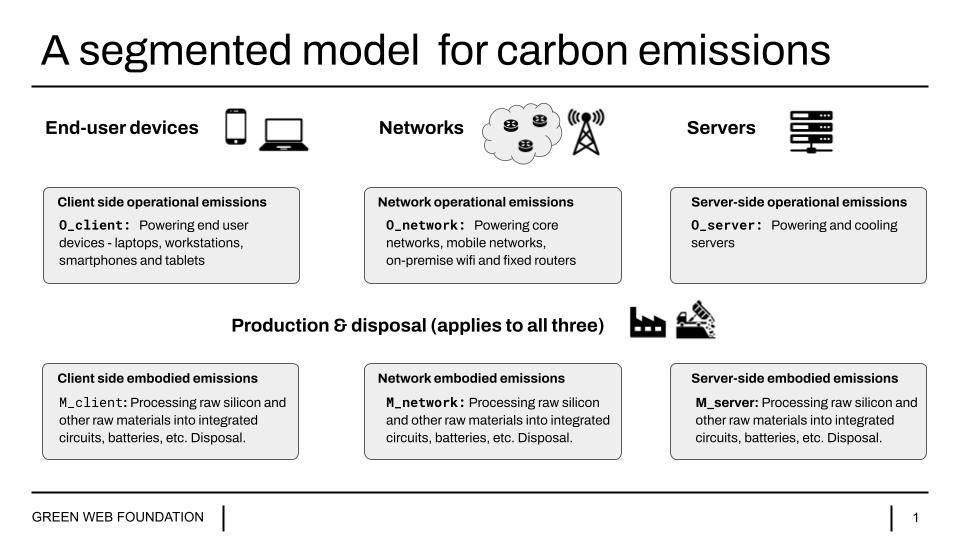
Let’s run through these together in the diagram, because we need to understand what they are, to understand how we allocate the energy consumption and resource usage from software to them.
Client side operational emissions – these are emissions that come from generating the energy used to power devices we might call ’clients’ devices, like laptops, phones, tablets and so on.
Client side embodied emissions – these are emissions that come from raw minerals like sand into silicon, and then into finished products like integrated circuits, or plastics, screens, and so on. This process can be extremely energy intensive in its own right, and every time we buy newly manufactured kit, this needs to be accounted for.
Network operational emissions – like the above these are carbon emissions for the power used to keep networks on, and transmitting data.
Network embodied emissions – as above, there’s a carbon footprint to making routers and cables too, so we need to include that as well.
Server side operational emissions – server side emissions refer to the energy used to actually power the servers that generate webpages, and serve them to clients.
Server side embodied emissions – like networking equipment and end-user client devices, we include emissions from making the steel and silicon used inside servers.
Once you have a number for each box, you have enough to create a SCI score for your chosen activity – i.e. your functional unit in SCI for Web parlance, like reading an article, or completing a purchase on an ecommerce site.
A key idea about Software Carbon Intensity, and this new standards, Software Carbon Intensity for the Web, is that software is a key driver of resource usage – software enables the activity that is useful, but results in resource consumption. We want to understand how to allocate this resource consumption fairly in a model, and in a way that recognises useful interventions to build more sustainable software, and incentive the behaviour that measurably reduces the unavoidable impacts that occur when building and using digital services.
For the rest of this post though, we’ll just focus on client-side emissions – the first two boxes on the left in our earlier diagram. We’ll cover the other boxes in future posts.
Note: There is an optional 7th box in the spec, O_dev, for the energy involved in software development, to capture things like running continuous integration, the use of generative AI in writing code. This isn’t pictured in the diagram, but it’s there if there is data, the SCI for Web spec allows for it.
How do we work out client-side emissions?
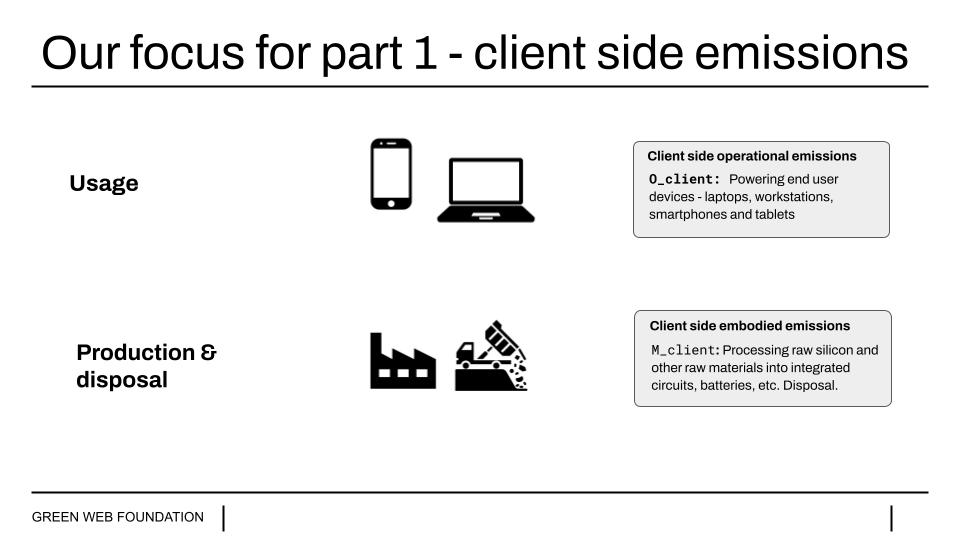
If we want to work out the client-side emissions to use in a standard calculation like a SCI for Web Score, we need to know the energy used by the browser to render and display a page on our screen, before we can convert that energy figure into carbon emissions. We do that by taking our energy consumption figure by multiplying it by a number that represents how ‘clean’ the energy is – the carbon intensity of the electricity in use.
We’ve written at length about carbon intensity of electricity elsewhere on our blog and with our verification services, so let’s put that aside for now, and focus on the quantifying the energy part. The energy consumption of a client device, like a phone or laptop can change significantly depending on how hard the device is working.
To make battery life last longer, or save energy in general, when a device is not working hard, some processors in a machine drop down into a lower power consumption state, or might be switched off entirely. Conversely, when performance is required, all the processing cores in a machine might light up to work together to crunch through some particularly heavy calculations and so on.
So intuitively, once we know that energy consumption does change depending on what a device is doing, the next question might be “yes, but by how much?”.
As we’ll see, answering this question can vary wildly in difficulty.
Different approaches for client side energy
Over the years, different groups have devised different models for coming up with a client side energy figure, because getting direct access to energy figures on a device can be difficult, or in some cases, deliberately blocked off.
The interests of space, we’ll refer to them as proxy measurement, hardware energy metering, and software energy metering.
Proxy measurement
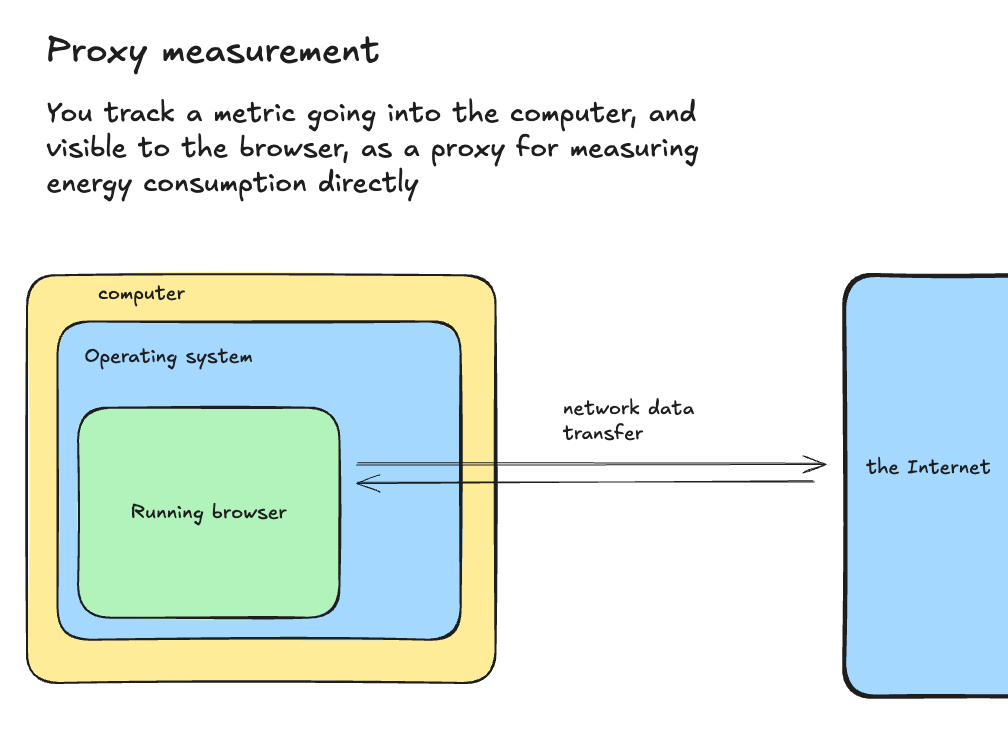
The clearest example here would be the “client side energy” figure in the Sustainable Web Design model in our own library, CO2.js. For the most part, this figure is derived from looking at the amount of data downloaded by a browser when it loads a web page, then multiplied by a single conversion factor – so a ‘large’ page that downloads lots of data might have a high client side energy figure, and a ‘small’ page that just downloads a smaller amount would have a lower client side figure.
Intuitively, this feels attractive, and if you’re web developer used to being rewarded for making small, fast loading pages, it’s flattering to your skill-set – if you halve the size of a page, it’s like you’ve halved its carbon footprint.
It’s also convenient. Of all the figures you might rely on having access to, “total amount of data transferred” is relatively simple to get hold of. Arguably, this simplicity has helped popularise the notion of digital sustainability, and make it more accessible to people without sustainability training.
However, this simplicity, while attractive at first, has a few problems.
Set up a device under controlled conditions with a hardware meter that tracks the power draw and visit a few sites of different sizes. You may see some pattern where ‘big’ pages with lots of data transfer might lead to more energy consumption than smaller ones, but the relationship is not directly proportional.
Why does this matter? Well, one reason is that if we optimise for the easy thing to measure that happens to flatter our existing skillset, then we can miss out on more effective interventions. In addition we can burn limited social capital getting people to do things that don’t deliver the savings we originally thought they did, or be accused of greenwash, when we’re making efforts in good faith.
Proxy measurement here isn’t a totally lost cause, and in the face of zero information, it might be better than nothing.
But can we do better?
Hardware energy metering
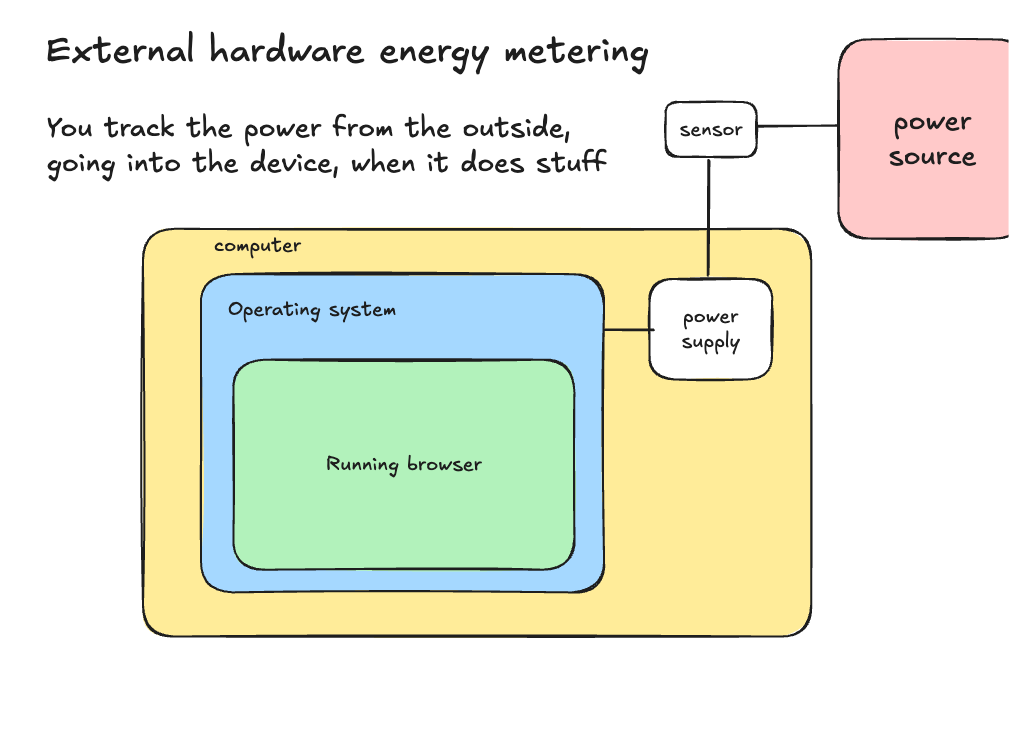
One alternative is to instrument a device with an external power meter connected to a source of energy, like a wall socket, or maybe battery, and track the energy passing through it.
If you have controlled conditions, with only one application running at a time, and only one site in use, you can get a more direct idea of how the power consumption changes as you visit different sites or use different applications. In many ways this is an improvement on the simpler proxy measurement.
These might be precise, controlled conditions, giving you a better idea of how changes in the design of an application influence how much power it consumes client-side, but it’s not exactly convenient, nor is it very accessible. As you need the time and money to set up something like a test lab, or in the very least, borrow someone else’s.
Also, because you’re viewing things “from the outside”, it can also be hard to see why any changes took place – the setup is not particularly observable, because you’re looking at an aggregated number for ALL the activity inside the deviced.
But knowing this is an option is helpful, because it can provide ground truth figures to compare against.
If we can describe a user journey in terms of steps that can be automated, like “visit page, scroll down to read content” or “click here, fill in that form, click submit on next three pages til you reach checkout “ then we can record, or describe these steps on a machine we’re using, and then have the same journey run in more controlled conditions to give us less noisy, more reliable numbers.
This is essentially what device labs like GreenSpector, or SauceLabs, Browserstack do today, when they provide energy consumption figures across the myriad physical devices they maintain. These are not free, but they do exist.
However, there is a third option.
A middle ground – software energy metering
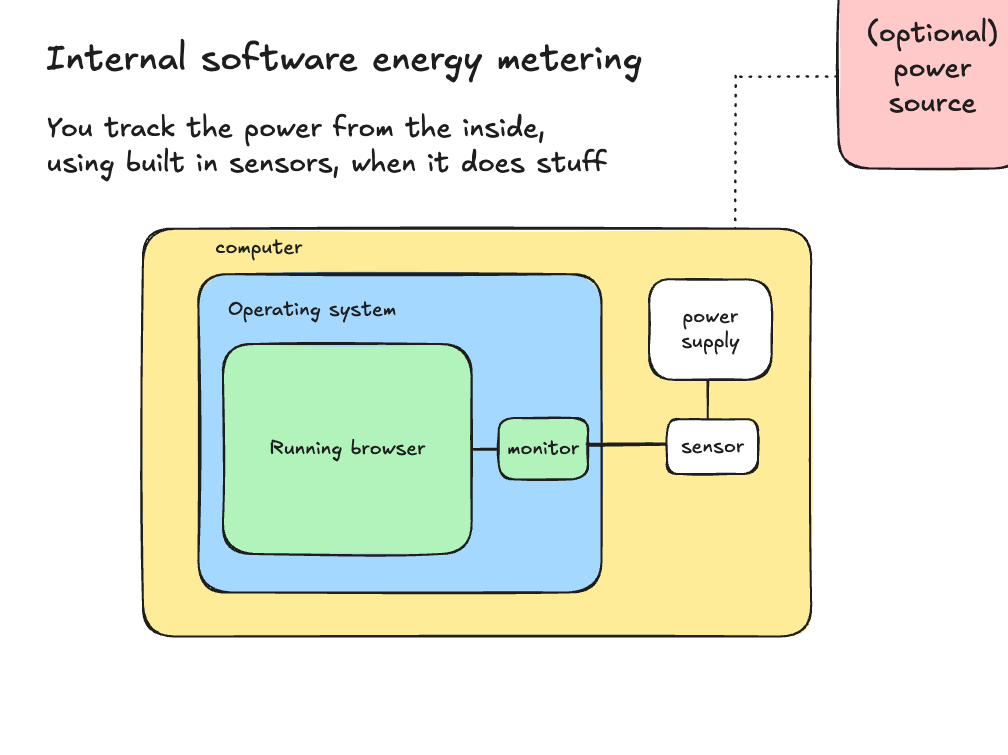
There is a third option, which we’ll call software energy metering – this relies on software on a device itself to track energy consumption, tapping into the capabilities of the devices themselves to self-describe how much energy they are consuming, and how their power changes from moment to moment.
How does this work?
For laptops and desktops, most recent software has some form of power management and power monitoring tooling built into the operating system. In some cases like with Apple’s mac desktops and laptops, the newer macs use chips designed by Apple to offer lots of insight into how power is being used, and without needing to have special administration privileges to view it.
At present, other platforms like Windows and Linux do not offer the same kind of isolation in the power info they show – at least not by default. This means the numbers can be noisier if you have other apps running on a given device. But if as we described before, we have a way to automate the actions you’re testing, then it’s possible to re-run these actions in less noisy environments, like a dedicated machine, or in a device lab mentioned above.
If you don’t have access to these, then simply running the same test multiple times can smooth out the influence of other software – an approach we can see in use in public coursework by Sustainable Software Engineering student’s public work at TU Delft.
These give us a much more solid foundation for saying things about the actual energy consumption of web pages and websites in general. This helps for standardised ways to talk about their impact – as well as things you might do to meaningfully influence what they consume.
Why is seeing ‘client-side’ energy and carbon emissions useful?
While the glib answer might be because it’s in a proposed standard it’s useful to check whether knowing anything about client side energy can actually inform decisions we might make as users and makers of software.
Fortunately, there’s now a trove of examples we can refer to, even looking at just outputs from the Sustainable Software Engineering course mentioned above. And because almost every study is published into the public domain, with accompanying an source code repository on Github, it means others can reproduce the results.
Let’s run through a few together, and the questions they ask
- “Does ad-blocking software use more energy than it saves for end users?”
The first is a study asking a user relevant question; “Does ad-blocking software use more energy than it saves for end users?”.
To answer this, the students used open source software energy metering tool, EnergiBridge, with a scripted browser to:
- see if there was a meaningful client energy use difference between different sites, based on how ad-heavy they were, and
- see if using a common adblocker, uBlock Origin Lite made a meaningful difference.
As the chart below shows, the answer is an emphatic yes.
The chart below shows the range of recorded energy consumption figures in testing for three different sites with the same browser – first with a ‘clean’ browser, and secondly with the ad-blocker switched on. A high box shows more energy than a low box, and a ‘tall’ box represents more variation in the recordings, than a ‘flatter’ one.
We can see that with Dailymail UK website, using an adblocker cuts energy usage by more than two thirds, implying that serving ads is the main driver of client side energy consumption.
We can also see that running adblockers themselves has an energy cost, and it might not make sense to have them running on sites where you’re not being served loads of ads anyway.
This is useful if you’re designing an ad-blocker, to minimise the impact, but also if you own a website, as it makes visible where the cost of ‘free’ services is being imposed.
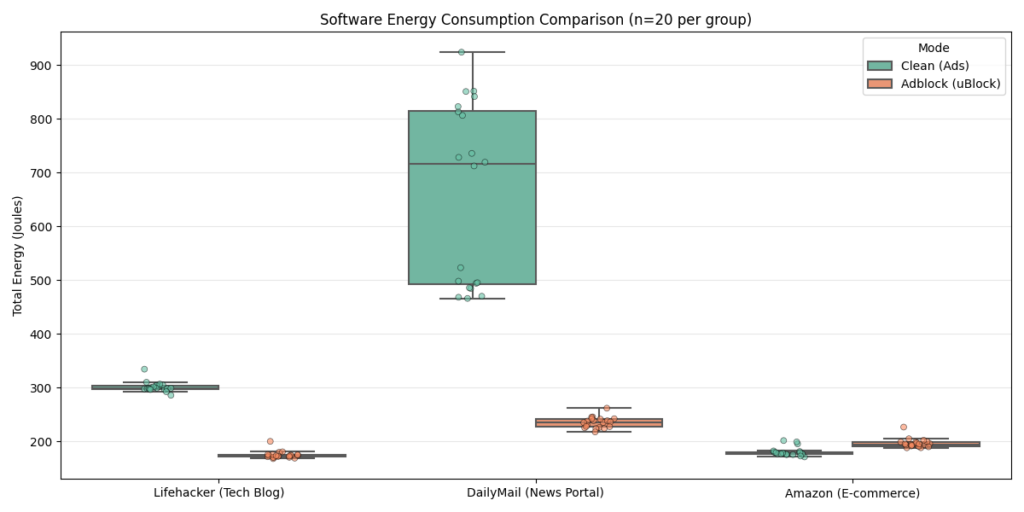
See the study page for more details – The Energy Cost of the ‘Free’ Internet: Do Adblockers Save Power?
That’s one browser. How about looking at how browsers handle the same activity on the same site?
2. “Do different browsers need differing amounts of energy to do the same thing on the same site?”
Again, if you use anything that uses a battery, this might be relevant for you, especially if the differences are meaningful.
One again, students from the same course used a similar set-up to ask this question too.
They wired up three different browsers in common use today, Chrome, Brave and Firefox, and used them all to watch the same video on Youtube, seeing what would happen.
The violin charts below show the difference, and we can see the answer is again yes.
In this test, we see Chrome consuming about a sixth more energy than Brave to do the same thing, and slightly more than Firefox.
Why use violin charts? They show the distribution of each test run, so we can see that in some cases Chrome ends up using almost twice the energy as Brave, but most of the time, the difference is more modest.
Based on this chart, if you used Youtube a lot in a browser, and you frequently ran on just battery power, you might think twice about defaulting to Chrome as your main browser.
Likewise, as an owner of a site like Youtube, if most of your users were Chrome users, you might prioritise improvements that reign in energy use for them, because your site imposes a disproportionate burden on them relative to others, and given Chrome’s huge market share, it would yield the most savings in absolute terms as well.
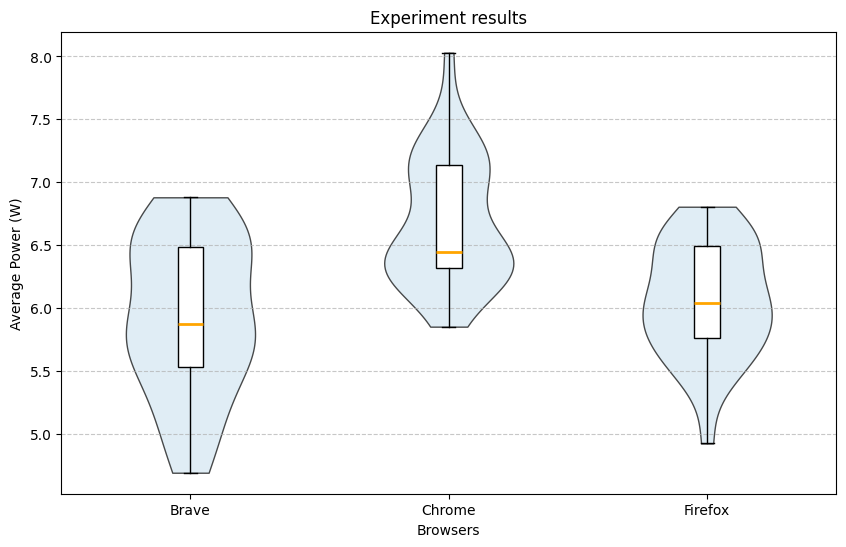
Again, here’s the study you can look into yourself – Comparison of Different Browsers in Terms of Power Efficiency for Streaming Video
There are myriad further questions explored in the other reports, and every single one is reproducible, because the papers and the project set-ups are all published and open source. This is how it should be.
Energy as a first class citizen in Devtools and automation
While the examples above might be interesting to read about, the developer experience for iteratively making changes to a website or web app with energy in mind still has room for improvement. Most browsers have nothing like the developer tooling you see open the “Devtools” panel, in a browser like Chrome, or Safari, or run a detailed performance Profiler, like Firefox.
However, “most browsers” is not the same as “no browsers”.
In 2022, nearly five years ago now, at the Green Web Foundation, we did some work with the Mozilla Firefox team to add carbon calculation into their developer oriented profiler tools, using our open source software library, CO2.js.
The Mozilla team had already done a lot of the hard work of figuring out how to read numbers from various kinds of hardware, but didn’t have the sustainability background, so we worked with them to make converting from energy to carbon possible the software we built.
You can see a screenshot of what gets exposed when you are using the profiler to measure specific activity, from a workshop we ran explaining how it works at an open source technology conference – actual absolute numbers for energy consumption, in standardised units. You can see the full exercise in this abridged slide deck demonstrating how to use the profiler.
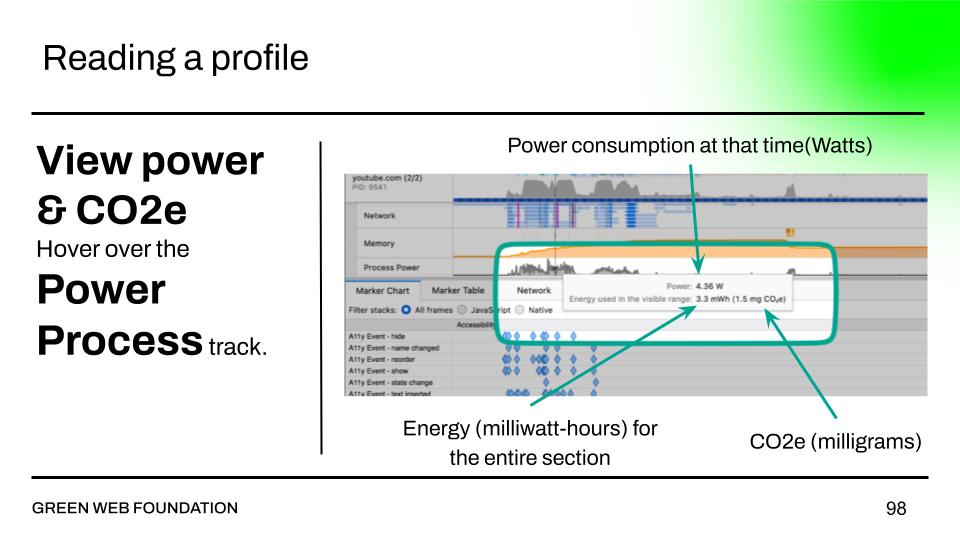
This level of detail, when surfaced in the profiling tools that web developers use, shows you precisely what the key drivers of energy consumption are when carry out an action on the page, and when they drive energy use.
Just like how people use these tools to design out overconsumption of computing resources, they can be used to do the same for energy, and do so with the confidence that the results are measurable and repeatable.
How does Firefox do this?
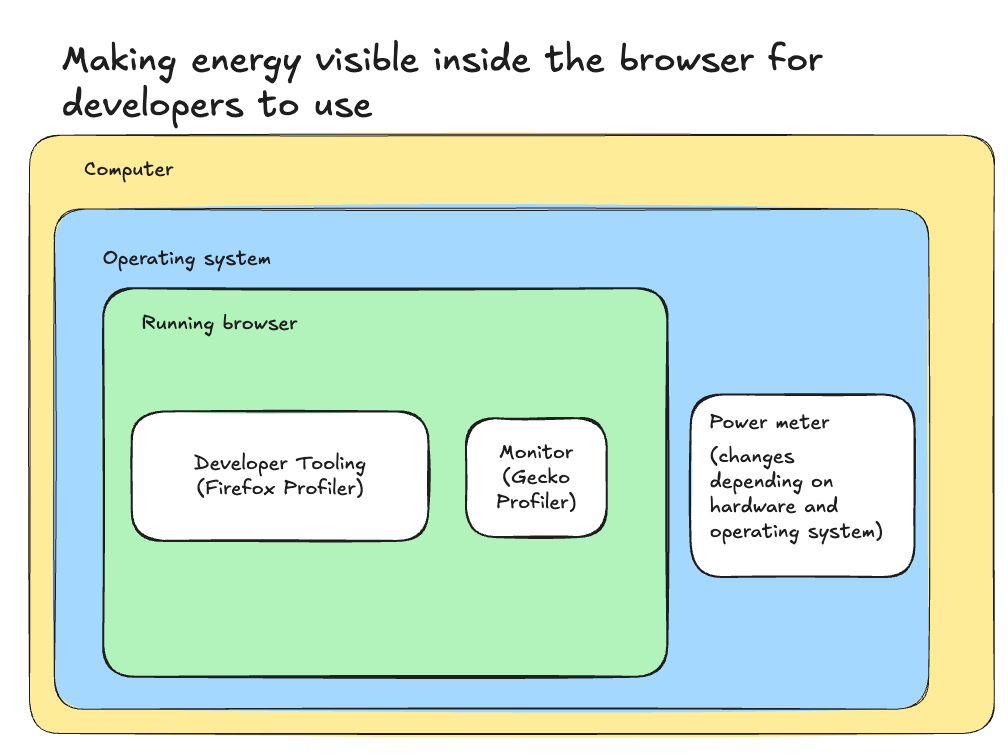
One nice thing is that because the Mozilla Firefox team work on an open source project, and also are very open about how they work, you can see in talks, in public documentation, and directly in the code how they built this into their browser.
But the short version is:
- They figured out how to read energy use from the different internal power tracking tools built into the most common computers and platforms, like Windows, MacOS, Linux and the different hardware they use. This is visible in the diagram as the power meter.
- They normalised across different devices, creating a special component in the software, that read these numbers across the different devices, and exposed them in consistent format for other software to read. This shows up as the monitor in the diagram.
- They extended their existing tooling in the browser to read from this component, and show energy use alongside other forms of resource usage in developer tooling. In Firefox this shows up as the Firefox Profiler, a formidable, but very powerful tool for understanding in detail what is happening when a browser carries out specific tasks.
Can the others do this too?
Our current view is that there is nothing stopping other browsers offering this level of visibility into energy use.
Mozilla’s Firefox is a relative minority browser now from a company that doesn’t make its own hardware. This means that they can not rely on any kind of special access that engineers inside Apple, or Google, or Microsoft might enjoy, who manufacture their own hardware. In addition.
And yet, it offers greater visibility into the energy consumed during use than any other browser, and because it’s an open source product, we can see exactly how it surfaces these numbers, and how others could do the same.
In fact, more than ten years ago we almost had this kind of visibility built into the Chromium project that underpins the majority of browsers in use in the world.
This is one thing we learned when our very own Fershad Irani went to TPAC last year, got talking to engineers there, and blogged about how we nearly had power profiling in Chromium. He even opened a new issue to track progress, than you can follow with too.
So if we don’t have it, it’s not because it’s technically impossible, nor because these companies can’t afford to add this kind of capability into their software.
Wrapping up
Anyway, this time around, we’re going to TPAC, and this time, we’re sharing posts like this ahead of the conference, to where we’re hoping we can can make further progress in seeing this kind of insight into the apps we build and use more common place.
There’s now a standard in development we’re working on, in consultation with the W3C, that will be going to ISO, the international standards organisation next year, and it uses functionality that was demonstrated to work in one browser.
In addition, there is a working version, in a fully open source browser that others can inspect and see how everything works.
If you’d like to see this in more browsers, and you’ll be at TPAC, we’re in the W3C slack, and happy to chat there – search for mrchrisadams, or fershad.
If you’re not going to TPAC, but still want to see this, we’d love to chat – we can help you with implementation if you build browsers, or tooling that might track power consumption, or implementing the SCI or Web standard in your work. Drop us a line.
If you’re on the other side and want to understand the environmental impact of digital services you’re working on, we can help you there too – see our updated services page for more details.
In future posts, we’ll cover updates in tracking energy and carbon emissions from networks – another part of the SCI for Web standard – and in another post, do the same for energy and carbon on the server.
Onwards!